AAX SDK  2.1.1
Avid Audio Extensions Development Kit
 All Classes Namespaces Files Functions Variables Typedefs Enumerations Enumerator Friends Macros Groups Pages
Classes | Functions
Description callback

Static configuration for an AAX plug-in.
On this page

About the Describe callback and AAX descriptor interfaces

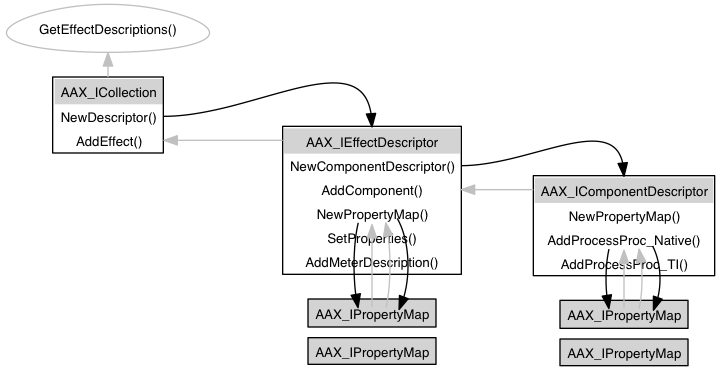
dot_aax_desc_interfaces.png
In Describe, a plug-in declares its static (or default) configuration and any properties that the host will need in order to manage the plug-in.
A plug-in's Describe callback ties the Algorithm, GUI, and Data Model together. In this callback, the plug-in provides a description of its algorithm callbacks, data connections, and other static plug-in properties using a set of host-provided description interfaces. The plug-in uses a tiered hierarchy of these description interfaces to complete its description:

The actual description callback entrypoint is ACFRegisterPlugin(), which is declared in AAX_Exports.cpp. This method is implemented inside of the AAX Library, where it calls the plug-in's custom implementation of the GetEffectDescriptions() callback.
// ***************************************************************************
// ROUTINE: GetEffectDescriptions
// ***************************************************************************
{
AAX_IEffectDescriptor * plugInDescriptor = outCollection->NewDescriptor();
if ( plugInDescriptor )
{
result = DemoGain_GetPlugInDescription( plugInDescriptor );
if ( result == AAX_SUCCESS )
outCollection->AddEffect( kEffectID_DemoGain, plugInDescriptor );
}
else result = AAX_ERROR_NULL_OBJECT;
outCollection->SetManufacturerName( "Avid, Inc." );
outCollection->AddPackageName( "DemoGain Plug-In" );
outCollection->AddPackageName( "DemoGain" );
outCollection->AddPackageName( "DmGi" );
outCollection->SetPackageVersion( 1 );
return result;
}
GetEffectDescriptions() from the DemoGain example plug-in
In general, the following procedure is used when describing an AAX plug-in:

  1. Create an Effect description interface from the Collection interface provided by the host
  2. Use the Effect description interface to create references to one or more component description interfaces.
  3. Describe each algorithm component by populating the component descriptions.
  4. Add the components to the Effect description
  5. Add additional modules and properties to the Effect description.
  6. Add the completed Effect to the Collection
  7. Repeat for any additional Effects included in the plug-in binary.
  8. Return the completed Collection interface to the host and exit.
Note
The host owns all memory associated with any descriptors that the plug-in returns via this callback.

Top level: Collection

The AAX_ICollection interface provides a creation function (AAX_ICollection::NewDescriptor()) for new plug-in descriptors, which in turn provides access to the various interfaces necessary for describing a plug-in (see the DemoGain_GetPlugInDescription() and DescribeAlgorithmComponent() listings below).
When a plug-in description is complete, it is added to the collection via the AAX_ICollection::AddEffect() method. The AAX_ICollection interface also provides some additional description methods that are used to describe the overall plug-in package. These methods can be used to describe the plug-in package's name, the name of the plug-in's manufacturer, and the plug-in package version. Once these have been described, the completed description interface is returned to the host and exits.
// ***************************************************************************
// ROUTINE: GetEffectDescriptions
// ***************************************************************************
{
.
.
.
AAX_IEffectDescriptor * plugInDescriptor = outCollection->NewDescriptor();
.
.
.
result = DemoGain_GetPlugInDescription( plugInDescriptor );
.
.
.
outCollection->AddEffect( kEffectID_DemoGain, plugInDescriptor );
.
.
.
outCollection->SetManufacturerName( "Avid, Inc." );
outCollection->AddPackageName( "DemoGain Plug-In" );
outCollection->AddPackageName( "DemoGain" );
outCollection->AddPackageName( "DmGi" );
outCollection->SetPackageVersion( 1 );
.
.
.
return result;
}
Populating the AAX_ICollection interface

Middle level: Effects

The AAX_IEffectDescriptor interface provides description methods that are used to describe the Effect, such as its name, category, associated page table, and, importantly, creation methods for its data model, GUI, and other AAX modules.
// ***************************************************************************
// ROUTINE: DemoGain_GetPlugInDescription
// ***************************************************************************
static AAX_Result DemoGain_GetPlugInDescription( AAX_IEffectDescriptor * outDescriptor )
{
int err;
AAX_IComponentDescriptor * compDesc = outDescriptor->NewComponentDescriptor ();
if ( !compDesc )
// Add empty component descriptors to the host, register a processing
// entrypoint for each, and populate with description information.
//
// Alg component
DescribeAlgorithmComponent( compDesc );
err = outDescriptor->AddComponent( compDesc ); AAX_ASSERT (err == 0);
outDescriptor->AddPlugInName ( "Demo Gain AAX" );
outDescriptor->AddPlugInName ( "Demo Gain" );
outDescriptor->AddPlugInName ( "DemoGain" );
outDescriptor->AddPlugInName ( "DmGain" );
outDescriptor->AddPlugInName ( "DGpr" );
outDescriptor->AddPlugInName ( "Dn" );
outDescriptor->AddPlugInCategory ( AAX_ePlugInCategory_Dynamics );
outDescriptor->AddProcPtr( (void *) DemoGain_Parameters::Create, kAAX_ProcPtrID_Create_EffectParameters );
outDescriptor->AddResourceInfo ( AAX_eResourceType_PageTable, "DemoGainPages.xml" );
#if PLUGGUI != 0
outDescriptor->AddProcPtr( (void *) DemoGain_GUI::Create, kAAX_ProcPtrID_Create_EffectGUI );
#endif
return AAX_SUCCESS;
}
Populating an AAX_IEffectDescriptor interface
All components in an Effect must share the same AAX modules; for example, it is not possible to use one data model definition for one sample rate and another data model definition for a different sample rate. Therefore, a plug-in's AAX modules are defined in its Effect description.

Registering multiple Effects

A single plug-in package may include multiple Effects, which are added in turn in the description method. Once these connections are made, Describe passes the host a populated description interface and returns.
For example, consider an EQ plug-in that contains both one-band and four-band variations, each of which the user should see as a distinct plug-in. These Effects would be described and added separately to the collection object and would appear as separate products to the user.
AAX_Result GetEffectsDescriptions ( AAX_ICollection * outCollection )
{
if ( result == AAX_SUCCESS )
{
AAX_IEffectDescriptor * aDesc1 = outCollection -> NewDescriptor ();
// ...
// Populate aDesc1 with one - band EQ description
// ...
result = outCollection -> AddEffect ( kEffectID_MyOneBandEQ , aDesc1 );
}
if ( result == AAX_SUCCESS )
{
AAX_IEffectDescriptor * aDesc4 = outCollection -> NewDescriptor ();
// ...
// Populate aDesc4 with four - band EQ description
// ...
result = outCollection -> AddEffect ( kEffectID_MyFourBandEQ , aDesc4 );
}
if ( result == AAX_SUCCESS )
{
outCollection -> SetManufacturerName ( "My Plug -Ins , Inc." );
outCollection -> AddPackageName ( " MyEQ Plug -In" );
outCollection -> AddPackageName ( " MyQ" ); // Short name
outCollection -> SetPackageVersion ( 1 );
}
return result ;
}
Registering multiple Effects in a single Collection

Lowest level: Algorithm components

In order to register an algorithm component, a plug-in must describe the component's external interface. This includes each of the component's ports and any other fi elds in its context structure, a reference to its processing function entrypoint (its "Process Procedure", or ProcessProc,) and any other special properties that the host should know about.
The description of a context structure involves a set of port definitions, which can be "hard-wired" to receive data from the host (such as audio buffers), from the plug-in's data model (such as packets of coefficients), or even from past calls to the algorithm (private, persistent algorithm state). See Real-time algorithm callback for more information on an algorithm's context structure.
static void DescribeAlgorithmComponent( AAX_IComponentDescriptor * outDesc )
{
.
.
.
// Subscribe context fields to host-provided services or information
err = outDesc->AddField ( eAlgFieldID_AudioIn, kAAX_FieldTypeAudioIn ); AAX_ASSERT(err == 0);
err = outDesc->AddField ( eAlgFieldID_AudioOut, kAAX_FieldTypeAudioOut ); AAX_ASSERT (err == 0);
err = outDesc->AddField ( eAlgFieldID_BufferSize, kAAX_FieldTypeAudioBufferLength ); AAX_ASSERT (err == 0);
// Register context fields as communications destinations
err = outDesc->AddDataInPort ( eAlgPortID_BypassIn, sizeof (int32_t) ); AAX_ASSERT (err == 0);
err = outDesc->AddDataInPort ( eAlgPortID_CoefsGainIn, sizeof (SDemoGain_CoefsGain) ); AAX_ASSERT (err == 0);
.
.
.
}
Populating a single AAX_IComponentDescriptor interface

Algorithm callback properties

A set of callback properties is required when adding a Process Procedure to an algorithm component. This is done via the AAX_IPropertyMap interface. Using distinct property maps, a single component may register multiple versions of its callback. For example, an audio processing component might register mono and stereo callbacks, or Native and TI callbacks, assigning each the applicable property mapping. This allows the host to determine the correct callback to use depending on the environment in which the plug-in is instantiated.
static void DescribeAlgorithmComponent( AAX_IComponentDescriptor * outDesc )
{
AAX_IPropertyMap * properties = outDesc->NewPropertyMap();
.
.
.
properties->Clear ();
properties->AddProperty ( AAX_eProperty_ManufacturerID, cDemoGain_ManufactureID );
properties->AddProperty ( AAX_eProperty_ProductID, cDemoGain_ProductID );
properties->AddProperty ( AAX_eProperty_CanBypass, true );
// Native and AudioSuite versions
properties->AddProperty ( AAX_eProperty_PlugInID_Native, cDemoGain_PlugInID_Native );
properties->AddProperty ( AAX_eProperty_PlugInID_AudioSuite, cDemoGain_PlugInID_AudioSuite ); // Since this is a linear plug-in the RTAS version can also be an AudioSuite version.
properties->AddProperty ( AAX_eProperty_AudioBufferLength, kAAX_NativeAudioBufferLength_Default);
err = outDesc->AddProcessProc_Native ( DemoGain_AlgorithmProcessFunction <1, 1, 1<<kAAX_NativeAudioBufferLength_Default>, properties ); AAX_ASSERT (err == 0);
// TI DSP Version
properties->AddProperty ( AAX_eProperty_PlugInID_TI, cDemoGain_PlugInID_TI );
}
Adding properties to a component description
AAX does not require that every value in AAX_IPropertyMap be assigned by the developer. However, if a speci c value is not assigned to one of an element's properties then the element must support any value for that property. For example, if an audio processing component does not provide any stem format properties then the host will assume that the callback will support any stem format.

Additional Topics

See Also
Plug-in meters

Classes

class  AAX_ICollection
 Interface to represent a plug-in binary's static description. More...
 
class  AAX_IComponentDescriptor
 Description interface for an AAX plug-in component. More...
 
class  AAX_IEffectDescriptor
 Description interface for an effect's (plug-in type's) components. More...
 
class  AAX_IPropertyMap
 Generic plug-in description property map. More...
 

Functions

AAX_Result AAXRegisterPlugin (IACFUnknown *pUnkHost, IACFPluginDefinition **ppPluginDefinition)
 The main plug-in registration method. More...
 
AAX_Result GetEffectDescriptions (AAX_ICollection *inCollection)
 The plug-in's static Description entrypoint. More...
 

Function Documentation

AAX_Result AAXRegisterPlugin ( IACFUnknown pUnkHost,
IACFPluginDefinition **  ppPluginDefinition 
)

The main plug-in registration method.

This method determines the number of components defined in the dll. The implementation of this method in the AAX library calls the following function, which must be implemented somewhere in your plug-in:

Wrapped by ACFRegisterPlugin()

Referenced by ACFRegisterPlugin().

Here is the caller graph for this function:

AAX_Result GetEffectDescriptions ( AAX_ICollection inCollection)

The plug-in's static Description entrypoint.

This function is responsible for describing an AAX plug-in to the host. It does this by populating an AAX_ICollection interface.

This function must be included in every plug-in that links to the AAX library. It is called when the host first loads the plug-in.

Parameters
[out]inCollection
Collaboration diagram for Description callback: