Communicating parameter state with the host.
On this page
An Introduction to Tokens
One way in which a plug-in can communicate with the "outside world" is through Shared Data Services, also known as the Token System. This is a mechanism that allows Pro Tools to share parameter information with external hardware and software modules. While the AAX SDK only uses the Token System indirectly, knowing how it works will provide a good understanding of how linked parameters should operate.
Entities
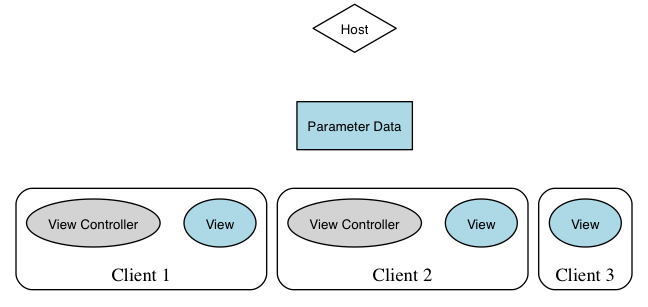
Entities in an example system
Touch
Touch tokens inform the system of user interaction with a parameter. When a parameter is being touched the system knows to stop sending automation data to the plug-in and just use the SET value of the parameter. It is also used to tell the system when to start/stop recording new automation data.
However, AAX plug-ins will rarely need to call these methods directly since the
AAX_CParameter and
AAX_CEffectParameters implementations will automatically handle parameter touch and release tokens whenever a new value is set on the parameter by the plug-in.
Other clients besides the plug-in may touch a parameter. Since the TOUCH token can come from a control surface the touch state will actually come back to the plug-in via:
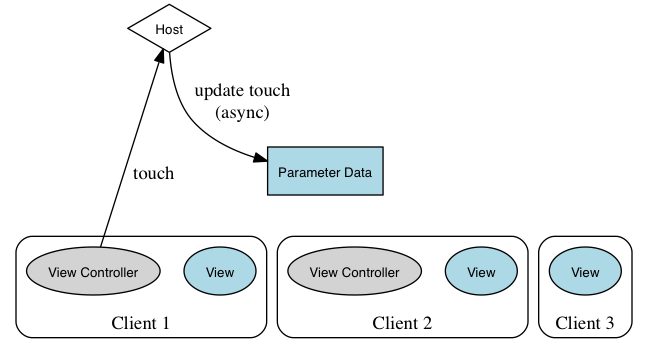
Touch request from a view controller, with resulting async touch update
Set
SET tokens can come from many different locations: the plug-in GUI, a control surface, loading a chunk or automation playback. Eventually the value of a SET token comes into the plug-in and that's when the internal value of the parameter gets updated. In AAX the SET token will be sent as a result of calling the following method:
class AAX_CParemeter<T>
{
void SetValue ( T newValue );
};
which will be called from many other supporting methods:
When a SET token enters the system from the GUI, control surface or automation the value comes bak to the plug-in via the following method:
At this point the internal contents of the plug-in are set.
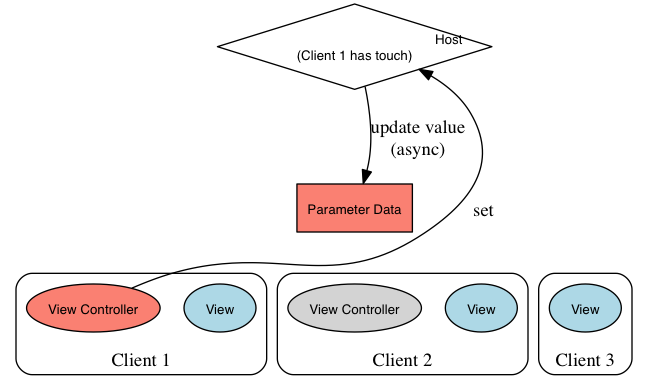
Set token asynchronously changes state of the parameter data
Update
An update token is generated when the internal value of a parameter has been set. GUIs and control surfaces listen for UPDATE tokens to update the displayed values. In AAX the UPDATE token is sent by calling the following method:
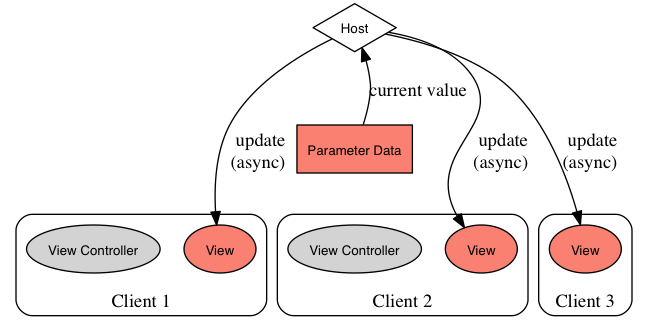
Update token triggers async updates to all views
Basic Token Operation
Here's how the system works for a standard update:
User Editing
- User clicks on a parameter in the GUI or grabs a parameter on the controls surface. A TOUCH token should be sent at this point.
- The user changes the parameter from the GUI or controls surface. A SET token should be sent at this point.
- The SET token goes into the system and comes back to the plugin via UpdateParameterNormalizedValue().
- The plug-in updates it's internal state and sends an UPDATE token.
- Repeat steps 2-4 while changing the parameter.
- The user lets go of the GUI or controls surface. A TOUCH token with the released state should be sent.
Automation Playback
- The SET token comes from the automation system and enters the plugin via UpdateParameterNormalizedValue().
- The plug-in updates it's internal state and sends an UPDATE token.
- Repeat steps 1-2 while playing back automation.
Chunk Restoring
- Plug-in loads the chunk.
- The plug-in sets every parameters value. Another thing to note is that the
- SetValue() method also contains Touch() and Release() calls. So, while setting every parameter there is a combination of TOUCH and SET tokens sent to the system.
- The SET tokens comes back to the plugin via UpdateParameterNormalizedValue().
- The plug-in updates it's internal state and sends out UPDATE tokens.


 1.8.5
1.8.5

